
User manual




BM-6280 User manual
~ 11 ~
Hardware Support – Line 0700 - EASYCARE
INITIAL SET-UP OF THE POCKET PC
The following section provides a friendly step-by-step guide that
assist you through the initial set up of the Bluemedia Pocket PC.
STEP 1: CHARGING THE POCKET PC BATTERY
The Bluemedia Pocket PC can be conveniently charged with
either the supplied AC adaptor or the optional USB dock.
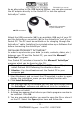
1. Slide the adaptor plug into the guide rail at the back of the AC
adaptor. Plug the AC adaptor into a wall outlet that is easily
accessible.
2. The charging status display flashes green until the Pocket PC is
charged. Do not interrupt the charging process before the battery
is fully charged. This may take a few hours. The Pocket PC is fully
charged if the charging display lights green. (Remember to
charge the Bluemedia Pocket PC for at least 10 hours for the first
time.)
3. Leave the mains adapter connected to the Pocket PC for around
24 hours, so that the backup battery also charges-up fully.