
System information


May 2012 5 Version 1.0
3.0 System Preparation
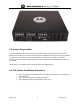
Once obtaining the NX platform and all its appropriate licensing, the system will need to be
installed. The following procedure includes system installation and setup procedures from initial
procurement of operating system and applications. The following procedure is for BETA
systems only and customer purchased systems may be different as OS and applications shall be
pre-loaded.
Obtain the source installation file to load OS and WING Applications
4.0 Lab System Installation Procedure
1. Insert the appropriate installation file on a USB drive and inmsert into USB port 1
on the NX box.
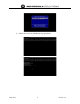
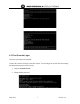
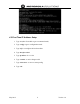
2. Select F3 on startup to select Boot Drive Menu.
3. Select load from USB FLASH DRIVE on the menu