
System information



May 2012 45 Version 1.0
5.5 Dial Plan Configuration
The Dial Plan is used to configure the telephone number ranges to be supported by Centro. Each
number range tells Centro whether or not to take calls made to phone numbers lying within the
defined Number Range. If a dialed or received telephone number does not lie within a Number
Range, Centro will not know how to handle the call, and the call will fail.
Centro supports three types of number ranges:
PSTN: This Type identifies number ranges which pertain to outgoing calls to the
PSTN.
Public: This Type identifies number ranges which apply to incoming calls. This is
usually the range of publically routable numbers which have been allocated to the
enterprise by the public Telco provider.
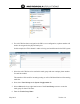
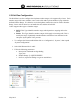
1. To configure the Extension Dial Plan click on “Configuration”, “System”, then expand
“System Configuration”.
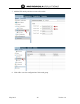
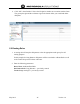
2. Select Dial Plan and click “Add”.
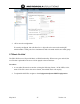
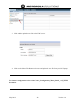
3. Fill in the following parameters:
a. Description: Outbound ten digit dialing
Type: pstn
b. Number Range: [2-9]XXXXXXXXX
c. Prefix: 9 (represents dialing 9 to get an outside line)