
System information




May 2012 26 Version 1.0
4.8 Installation of URC PBX Application
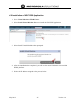
1. Go to Virtual Machines/TEAM Centro.
2. Select Install Virtual Machine Button to install the URC PBX application.
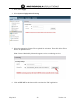
3. Select Install Virtual Machine when prompted.
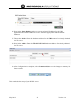
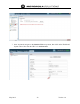
4. After the installation has completed, you will see the result VM details screen within
WING platform.
5. Notice the IP address assigned to the process below.