
System information




May 2012 23 Version 1.0
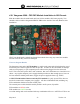
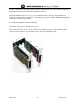
4.6.1 Sangoma A200 - FXO FXS Module Installation in NX Chassis
Slide the modules into the main board until you feel the modules click home properly. You
should be able to read the designation FXO or FXS on the outside of the card (Remora) after
installation.
NB: If you should make a mistake and install the modules the wrong way round, the modules
will not work, but they will not be damaged.
Notes on Sangoma Boards:
The Sangoma A200 card with FXS modules, or A200 cards connected via backplane bus, need
much more power than a regular PCI bus can provide. In order for an FXS module or multiple
cards to work properly, a 4 pin computer power cable must be plugged in to the main card
itself. This is the same power cable, male connector, that one would connect to a hard driver or a
cdrom. Any regular computer power supply should provide more than enough power, however
for best and most reliable performance, bigger the power supply the better (eg: 450W)
A SINGLE A200 with no Remora and only FXO modules (i.e.pnly 4 ports FXO) does not
need to be connected to computer power supply! All other combinations DO, including any
FXO combination that has more than 4 FXO ports!
The external power cable should be used by default on all systems, if possible.
FXO modules are RED in color
FXS modules are GREEN in color
An A200 Analog card can be outfitted with any combination of the two. All FXO or FXS or one