
System information




May 2012 22 Version 1.0
4.6 Installing FXO/FXS Gateway Board onto NX platform expansion
card slot
The NX platform supports up to 4 add-on modules for such functions as FXO, FXS as well as
T1/E1 Gateway termination boards for PSTN connection to the URC system.
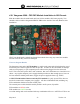
The Motorola URC system supports internal Sangoma gateway boards to be installed internally
into the NX chassis 4 port expansion slots. The following example configuration will be based
on istallation of Sangoma FXO/FXS A200 series combination gateway boards. The
configuration will include 2 FXS (stations) and 2 FXO (trunks) ports for use.
To install an expansion module:
1. Remove the expansion card cover for the expansion module bay.
2. Insert the expansion module into the expansion module bay.
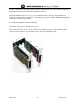
3. Tighten the retention screws on the sides of the expansion module. The following figure
represents the installation of the expansion module for the NX-4524 and NX-6524 models: