
System information





May 2012 18 Version 1.0
4.5 DHCP Server Setup
In order to utilize the DHCP services on the NX platform. The following steps will be needed to
be accomplished on the DHCP server configuration on the URC NX platform. The following
steps are sample configuration performed in lab.
1. Login to the CLI interface via putty or terminal emulation program.
2. Login as admin/password previously set in the initial setup of the system.
3. Enter the following commands to determine the MAC address of the URC PBX services
and TEAM Mobile Extensions (PTT) service.
For TEAM URC (PBX) = show virtual-machine configuration team-centro
For TEAM Mobile Extensions (PTT) = show virtual configuration team-vowlan
4. Next using a web browser, Login to the WING GUI as admin/password.
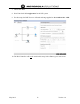
5. To setup DHCP configuration. Select the 1– Configuration / 2- Services / 3 - DHCP
Server Policy
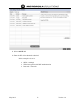
6. Next select the default-vlan-1 DHCP Pool.
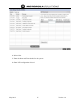
7. Click the Global Settings tab on the top menu to enter additional DHCP options. In this
example the tftp (option 66) and the oap (option 43) will be used.
The TFTP service will be used for IP desksets to download binary files and the oap
option will be used for wireless handset binaries/configuration downloads.
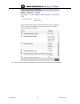
8. Select ADD ROW to enter DHCP option details.