
User manual

ROUTE 66 Mobile 8 Chicago 8000 - User Manual
99
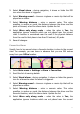
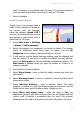
1. Select Main menu > Settings > Extras > Safety cameras
interval.
2. Specify the frequency of receiving new safety cameras information on
your device.
3. Scroll the list.
4. Select and save a frequency.
5. Save the change.
To receive automatic updates, you need a connection to the
internet!
Source for traffic information
Your ROUTE 66 product allows you to receive the latest traffic messages
on your device. Thus, you can avoid traffic jams, road works or accidents
that occur along your route.
The traffic information is gathered by specialized traffic-monitoring
centres. Then, the information is broadcast via the Traffic Message
Channel (TMC). Depending on the device you use, you can choose one of
the following solutions to update your list of traffic messages:
RDS - Currently, the Radio Data System (RDS) technology is
supported by most Personal Navigation Devices (PNDs), Windows
Mobile smartphones and PocketPCs. The TMC messages are received
by drivers via an RDS receiver (built-in or stand-alone). An external
antenna is also required. The information is continuously updated.
Internet - Most Windows Mobile smartphones and certain PocketPCs
(only in case of Windows Mobile for Pocket PC Phone Edition) use a
GPRS (internet) connection to receive traffic information. The
information is updated at a time interval specified by the user.
Traffic information is available for selected countries and
selected products!