
User manual

ROUTE 66 Mobile 8 Chicago 8000 - User Manual
93
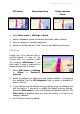
Navigation Bar Transparency
Select the degree of transparency of your navigation bar.
Move the slider to the left (minimum transparency) or to the right
(maximum transparency).
Speed
Set the speed value for each type of road.
When the application calculates a route, it takes into account not only the
distance to the destination but also the road types that must be reached.
For each type of road there is a default speed value (for example, 110
km/h or 70 mph for motorways).
These default speed values are based on statistical research. However,
because these values can vary from region to region, you can manually
modify each speed in order to reflect the local conditions and limitations.
The new speed values will be taken into account when a route is
calculated.
1. Select Main menu > Settings > Speed.
2. Select a type of road.
3. Select again to open the keyboard.
4. Enter a numeric value.
5. Update the list.
6. In the Speed settings screen save the changes.
Configure Alarm
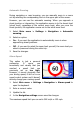
During navigation, you pass by points-of-interest, favourites or safety
cameras located along or near the road.
To know in time that you are approaching one of these locations, activate
this warning method. For example, if you activate the POI category
Eating & Drinking, you will be warned when you are approaching a
restaurant or a coffee shop, and you have plenty of time to decrease the
speed or to take the correct exit.