
User manual



ROUTE 66 Mobile 8 Chicago 8000 - User Manual
52
HOW CAN I PLAN MY TRIPS?
Plan a New Trip
You can start planning a trip from any section of the application, as
follows:
Select Main menu > Trips > [New trip].
in any list: highlight an item, then select Main menu > Add to
route.
from the map: when the cursor is active (it indicates a location on the
map), select Main menu > Add to route.
To plan a route:
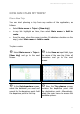
Select Main menu > Trips >
[New trip] and go to the next
screen.
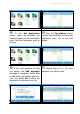
In the Save as input field, type
the name of the new trip. Enter all
characters and go to the next
screen.
In the Set departure screen,
select the database you need and
search for the departure point. Add
the departure point to this trip.
Now, the Trip planner screen
contains the departure point. Add
the destination point. Alternatively,
select the main menu to access the
available options.