
User manual

ROUTE 66 Mobile 8 Chicago 8000 - User Manual
50
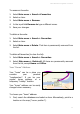
1. Select Main menu > Save. Or, in the contextual menu select Save
cursor position.
2. Select Save as home address.
3. The “home” address is saved and ready to be used for navigation,
route planning or browsing.
Your “Office” Address
Your “office” can be a place you
consider your business
“headquarters”. It can be your
regular business office, or a
temporary “business trip” location.
Your “office” address can be easily
changed when necessary.
To choose your “office” address:
1. First, search the databases and select an item. Alternatively, point to a
location on the map (“cursor position”).
2. Select Main menu > Save. Or, in the contextual menu select Save
cursor position.
3. Select Save as office address.
4. The “office” address is saved and ready to be used for navigation,
route planning or browsing.
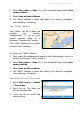
Searching the List of Favourites
1. Select Main menu > Search
> Favourites.
2. Scroll the list. The items are
ordered alphabetically.
3.
Scroll the list of results and
select an item.