
User manual
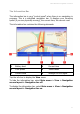
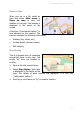
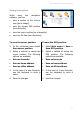
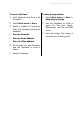

ROUTE 66 Mobile 8 Chicago 8000 - User Manual
48
you intend to use it, you simply pick it up from your personal list.
When you open the application for the first time, the list is empty, except
for the special favourites Home and Office, which are not defined yet.
You can save as a favourite any address, history record, point-of-interest
or cursor position.
Select Main menu > Search > Favourites.
Adding, Renaming, Deleting Favourites
To add a favourite:
1. First, search a database and select an item. Alternatively, point to a
location on the map (“cursor position”).
2. Select Main menu > Save. Or, in the contextual menu select Save
cursor position.
3. Select Save as Favourite.
4. Leave the pre-filled name or write a different name.
5. Save the new favourite.
6. The new location is displayed in the list of favourites.