
User manual

ROUTE 66 Mobile 8 Chicago 8000 - User Manual
45
HOW CAN I FIND THE PLACE I NEED?
Search Menu
Use this section to find the place
you need. After you find a location,
you can start navigating towards it,
save it or add it to a trip.
The following options are available:
Locations - Search for a location by typing a city name, a street
name, or the destination name.
Favourites – Search in the list of favourite places.
History – Search in the list of history records (locations you visited or
used recently).
Points-of-interest – Search points-of-interest located around the
current route, around the departure, around the destination, around
the cursor position, or around the GPS position.
Latitude / Longitude – Search for a location by entering its
geographical coordinates (latitude and longitude).
Searching Location
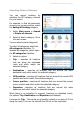
You can search locations by city
name, street name or postcode.
1. Select Main menu > Search
> Locations.
2. In the input field enter relevant
keywords.
3. Start the search.
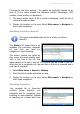
4. Scroll the list of results and select an item.
5.
Display the location on the map. Select Main menu > Navigate to
start a new navigation.