
User manual

ROUTE 66 Mobile 8 Chicago 8000 - User Manual
31
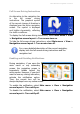
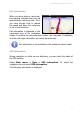
Full Screen Driving Instructions
An alternative to the navigation bar
is the full screen driving
instructions. The graphical symbol
of the current change of direction is
displayed over the entire navigation
screen. The symbol is displayed
and hidden dynamically, reflecting
the traffic conditions.
To display the full screen driving instructions, select Main menu > View
> Navigation screen layout > Turn arrow view on.
To hide the full screen driving instructions, select Main menu > View >
Navigation screen layout > Turn arrow view off.
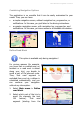
For a more detailed description of the current navigation,
display both the full screen driving instructions and the
navigation bar!
Enabling and Disabling Notifications
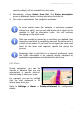
During navigation, if you open the
main menu or any secondary
screen, the navigation screen is
temporarily hidden behind the
active screen. However, if you don’t
want to lose any driving instruction,
activate the notification option.
Thus, the current turn will be
always displayed over any active screen.
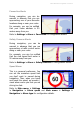
To enable the notification, select Main menu > View > Navigation
screen layout > Turn notify on.
To disable the notification, select Main menu > View > Navigation
screen layout > Turn notify off.