
User manual

ROUTE 66 Mobile 8 Chicago 8000 - User Manual
28
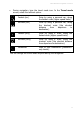
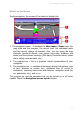
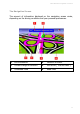
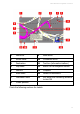
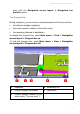
1 Battery level 8 Current speed
2 Current change of direction. 9 Travel mode
3 Remaining distance to the
current change of direction
10 Remaining distance to the
next change of direction
4 Estimated time of arrival to
destination
11 Name and code of next
road
5 Remaining travel time to
destination
12 Next change of direction
6 Name and code of current
road
13 Strength of GPS signal
7 Remaining travel distance to
destination
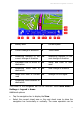
The colour of the navigation bar can be modified. Select Main menu >
Settings > Legend > Areas.
Additional options:
Tap the navigation bar to display the View.
Select the current street area or the next street area to place the
navigation bar horizontally or vertically. The same operation can be