
User manual

ROUTE 66 Mobile 8 Chicago 8000 - User Manual
24
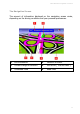
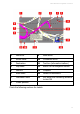
What’s on the Screen
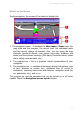
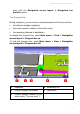
During navigation, the screen of the device is divided into:
1. The navigation screen – it contains the Main menu / Zoom icons, the
map scale and the compass, the current road, the calculated route
and the current change of direction. Also, you can check the map
elements (points-of-interest, road names and codes, buildings and
areas) and the dynamic warnings (POI alarm, Favourites alarm, speed
alarm, safety cameras alarm, etc.)
2. The progress bar – this is a graphical overall representation of your
navigation.
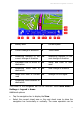
3. The navigation bar – it contains all necessary driving instructions: type
of turn, distance to current turn, estimated time of arrival to
destination, remaining travel time and distance, navigation mode (by
car, pedestrian, etc.), and so on.
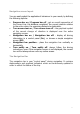
The progress bar and the navigation bar can be turned on or off when
needed. Check the Navigation screen layout chapter.