
User manual

ROUTE 66 Mobile 8 Chicago 8000 - User Manual
23
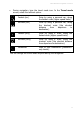
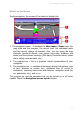
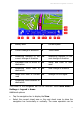
During navigation, type the travel mode icon. In the Travel mode
screen, select the relevant option.
Fastest (car) Drive by using a personal car, along
the fastest route (higher speed limits).
Shortest (car) Drive by using a personal car, along
the shortest route (the shortest
distance from departure to
destination).
Fastest (lorry) Drive by using a truck, along the
fastest route (higher speed limits).
Shortest (lorry) Drive by using a truck, along the
shortest route (the shortest distance
from departure to destination).
Pedestrian Walk to your destination (pedestrian-
only tracks).
You can change the travel mode anytime during the navigation!