
User manual



ROUTE 66 Mobile 8 Chicago 8000 - User Manual
19
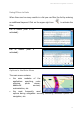
Options in a List
When you are in a list, select the Main menu and open the list of
options relevant for this context.
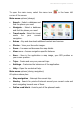
List options:
Navigate to - Start a (new)
navigation. The list item is the
destination.
Show on map – Display on the
map the selected item.
Add to route - Add the list item
to a (new) trip.
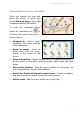
Search Points-of-interest around - Select a category and search
points-of-interest around the list item.
Mark/Unmark – Select or deselect an item / several items / all items
from the list. For example, you
can select and then delete an
entry.
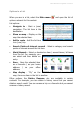
Save - Save the selected item
as a favourite / as your home
address / as your office
address.
Map display - “Fly” on the
map, from one item in the list to another.
Other options, like Delete, Rename, etc. are available in certain
contexts. For example, you can delete a history record but you cannot
delete a search result. You can rename a trip or a favourite but you cannot
rename a history record.