
User manual



ROUTE 66 Mobile 8 Chicago 8000 - User Manual
17
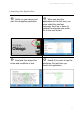
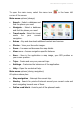
To open the main menu, select the menu icon in the lower left
corner of the screen.
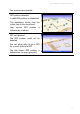
Main menu options (always):
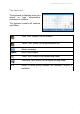
Search – Select a database and
find the places you need.
Navigate – Select a database
and find the places you need.
Travel mode - Select the travel
mode for your current
navigation.
Extras – Buy and download additional content and services.
Photos – View your favourite images.
Zoom – Increase and decrease the map details.
View menu – Access navigation-specific features.
Save – Save in the application a map image, your GPS position or
your cursor position.
Trips – Create and use your personal trips.
Settings – Customize the behaviour of the application.
Help – Open the contextual help.
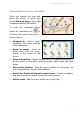
Main menu options (during navigation):
All options above plus:
Stop navigation - Interrupt the current trip.
Nearby - Search for points-of-interest around your current route and
start navigating towards one of them.
Define road block - Avoid a part of the planned route.