
User manual



ROUTE 66 Mobile 8 Chicago 8000 - User Manual
15
The Keyboard
The keyboard is displayed when you
intend to type alphanumeric
characters or symbols.
The keyboard contains all numbers
and letters.
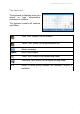
“Face” icon. Display a list of symbols.
“Letter” icon. Return to the alphanumeric list.
Delete characters.
Space Enter a blank space.
“Hand” icon. Switch to the handwriting mode.
“Keyboard” icon. Return to the regular writing mode.
“EN” Switch to other writing systems (for example, Chinese, if
available).