
User manual



ROUTE 66 Mobile 8 Chicago 8000 - User Manual
14
Common Buttons
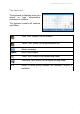
The most frequently used buttons are:
Open the main modules (Search, Photos, etc.) or open the
main options of a module.
Open the contextual menu.
Confirm a choice, start an action, go to the next screen, save
changes.
Abort operation or discard changes.
Black tick. This list item is not selected.
Blue tick. This list item is selected.
Green tick (used only for the All categories item in a list).
Some (but not all) items in the list are selected.
Return to the previous screen.
Go to the next screen.
Scroll up to the beginning of the list.
Scroll down to the end of the list.
Filter results by entering keywords.