
User manual


ROUTE 66 Mobile 8 Chicago 8000 - User Manual
107
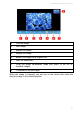
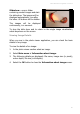
Slideshow – open a folder
containing several images and start
the slide show. The images will be
displayed automatically, one after
the other. All buttons will be hidden.
The images will be displayed
continuously, in a carousel.
To stop the slide show and to return to the single image visualization,
select anywhere on the screen.
Viewing Image Details
When you are in the photo viewer application, you can check the basic
details of any image.
To view the details of an image:
1. In the photo viewer section select an image.
2. Select Main menu > Information about image.
3. The following details are displayed: file name, image size (in pixels),
colour depth, file size (in kilobytes).
4. Select the OK button to close the Information about image screen.