
User manual


ROUTE 66 Mobile 8 Chicago 8000 - User Manual
106
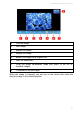
1 Previous image
2 Next image
3 Reduce the image
4 Enlarge the image
5 Restore the image to its original size
6 Start the slide show.
7 Close the image visualization mode and return to the list of
available images.
8 Thumbnail of current image.
When the image is enlarged, you can tap on the screen then hold and
drag the image in the desired position.