
User manual
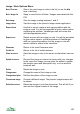

Change name Change the name of the image or note.
Delete from server Delete the image or note from the server. This will fail if you
were not the original creator of the image.
Report error Report an error with the image or note. You will be
prompted to enter a short explanatory note. ViewRanger
staff will view your note and if possible correct the error.
Report abuse Use this to report a serious and urgent problem with the
image or note. You will be prompted to enter a short reason
explaining the problem. ViewRanger staff will review this
and take appropriate action.
Match Images to Track
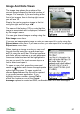
The easiest way to geo-locate photos is to record a track and take photos using
the phones camera. When you finish your trip match the photos to the track.
ViewRanger will create a POI set containing a correctly located POI for each
photo for the whole track. Creating a POI set is an advantage because the POIs
are ready grouped - they can be switched on and off in one go, and can be
shared to the server in one go.
To do this select the track you recorded, press the cursor pad centre or
button and choose Match images to track. ViewRanger will search all your
photos for those that were taken during the time span of the track. It will create
a new POI set, with a POI for each photo, the POI is correctly located based on
the time the photo was taken and the POI is associated with that photo.
96