
User manual
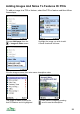
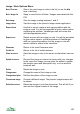

<link href=”...”>...</link> – a file or web link. For example,
<link href=”video.3gp”>Video</link> - inserts a named link Video, which points
to the file video.3gp. If clicked on ViewRanger will search the phone for that file
and open it. The href can also be a web link. The href= can be omitted, so <link
video.3gp>Video</link> is equivalent. Note that web links are automatically
spotted, the advantage of this format is that you can display a name for the link.
<loc X Y>...</loc> – a location link. For example, <loc 12300 45000>My
house</loc> is displayed as My house. Clicking on the link jumps to the map,
centred on that location. If the coordinates contain decimal points they are
treated as latitude and longitude, otherwise as grid coordinates.
<sound href=”...”>...</sound> – like a link, but specifies a sound file.
<alarm>...</alarm> - a special tag, used to surround a link or sound, telling
ViewRanger to use that item when the navigation arrival alarm is triggered.
<h1>, <h2>, <h3> – headings, h1 being the largest and h3 being the smallest.
Tags can be nested so <b><it><rd>text</rd></it></b> would display text in
bold, red italics.
The formatting is very permissive and not strictly parsed. If you miss out closing
tags, or mis-order them, there will not be a complaint, but the result might not be
what you want.
92