
User manual

Web Links, Phone Calls, Messages & E-Mails
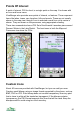
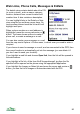
The details view contains details about the POI
(or route or track), such as name, category,
location, distance from current location and
creation time. It also contains a description.
You can highlight links in the Details or Note
view using the up and down cursor keys. On
touch screen phones touch the link and it will
highlight and open.
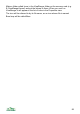
When a phone number or e-mail address is
highlighted, press the cursor pad centre or
button. The menu shows options to make a
phone call, or create a message or e-mail.
You can also create a new message or e-mail
from the map view’s Options > Phone menu, in which case you need to enter a
recipient.
If you choose to send a message or e-mail, and are connected to the GPS, then
the current location is automatically put into the message (you can delete it if
you don’t want to send your location).
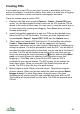
If you highlight a web link and choose Open link, then the link will be opened in
the web browser.
If you highlight a file link, of the form file:E:\Images\image1.jpg then the file
specified will be opened on the phone using the appropriate application.
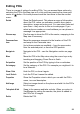
If you highlight the Images or Notes link and press the cursor pad centre or
button, you see the list of Images or Notes associated with the POI.
90