
User manual


Points Of Interest
A point of interest, POI for short, is a single point on the map. It is shown with
an icon and has a name.
ViewRanger also provides area points of interest, or features. These represent
items like lakes, towns, sea, beaches, hills and woods. These are not usually
shown in the map view, though if one is selected a small icon at its centre is
shown. They are drawn on the panorama, using appropriate shading.
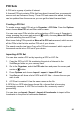
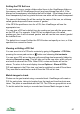
These two screenshots show a POI Set of the Keswick Launches piers around
Derwent Water in the Lake District. The boat icons in both the Map and
Panorama view show the POIs.
Custom Icons
About 40 icons are provided with ViewRanger, but you can add your own.
Create a small bitmap using an image format supported by the phone, such as
BMP, PNG or JPG. If the bitmap does not contain transparency then any pixel
that is close to white will be treated as transparent. If the bitmap contains
transparency (the PNG format supports this) then that will be used. Keep the
bitmaps small to avoid using too much memory.
81