
User manual


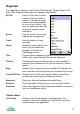
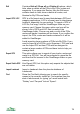


All other items will be temporarily hidden so only the search results are
shown. To return to normal display choose Options > Show all POIs.
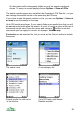
The search results appear as a set within the Organizer’s POI Sets list – so you
can manage the search results in the same way as POI sets.
If you chose to see the search results in a list, you can use Options > View set
on map to see the results on the map.
Up to 250 results are shown. If your search finds more results than that you will
be warned and should refine the search. A count of results is given at the top of
the search results view. Press the cursor pad centre or button to see the
commands you can apply to a result, for example, View on map.
Postcodes can be searched for, but you must set the 'Server' option to include
the server.
The search view A sub-category list
Search results list, with count List of POI sets, with Search
in the title bar Results included
80