
User manual




Search
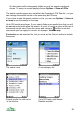
The search view allows you to search the gazetteer and POI sets. It also
optionally searches the ViewRanger server. You can search by text, area or
category. You can choose to see the results in a list or on the map.
The search panel can be accessed by choosing Search from the Options menu,
or by pressing 3. It can also be accessed from the Organizer by choosing the
Search item.
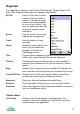
The search fields are:
• Name – this matches the start of words in the name and description of
POIs. For example, ‘cam’ matches both ‘River Cam’ and ‘Cambridge’ but
does not match ‘Occam’. ‘Ri ca’ matches ‘River Cam’ but not ‘River Dart’.
Apostrophes are ignored by the search. Hyphens and other punctuation are
treated as word separators. You can type full names too.
• County – this is only used by the Gazetteer and matches the county or
area name. Abbreviations are not used, so for example enter Oxfo and not
Oxon for Oxfordshire.
• Type & Sub-Type – these fields allow you to choose the category of the
item you wish to find. The first field sets the broad category, for example
‘Places’. The second field refines that choice. For example for Places you
could choose between towns, lakes, hills and woods. When set to ‘Any’ the
field matches all of the categories or sub-categories.
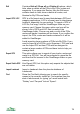
• Distance – choose the distance from the current location that should be
searched. There are three options:
o Unlimited, which searches the whole country
o Visible map, which searches only the area of map that is shown in
the map view
o Manual, searches the area given by the distance entered in the
second box. For example, if the distance is 20km, the search looks
for results within 20km of the centre of the map.
• Server – controls whether to search for POIs held on the phone handset,
on the ViewRanger server, or to search both server and handset.
• Shared – shared POIs are those that have been created by other users.
Licensed POIs are those that have been provided from commercial
sources, such as Ordnance Survey. This switch controls whether shared
POIs, licensed POIs, or both should be searched.
• Display – sets whether to display the results in a list or on the map. If you
choose the map, the map will zoom and pan to show all the search results.
79