
User manual


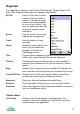


Edit Contains Hide all, Show all and Delete all options, which
hide, show or delete all the POIs in My POIs, routes and
waypoints. If you swap into Routes, then the Edit menu
contains items to hide, show or delete all routes, and
likewise for My POIs and tracks.
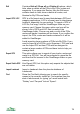
Import GPX / LOC GPX is a file format used to send data between GPS and
mapping applications. LOC is a format used to interchange
locations, especially for geo-caching. To import a GPX or
LOC file, first copy it into the ViewRanger folder on your
memory card. Choose this menu option and you will be
shown a list of GPX and LOC files currently in the
ViewRanger folder. Choose one and a count of the POIs,
routes and tracks it contains will be shown. If you confirm the
import, the POIs, routes and tracks contained in it will be
added to ViewRanger.
Avoid importing large numbers of POIs into My POIs. If you
need to import a lot of POIs, go to Organizer > POI sets and
use the Import POI set item. POI sets are designed to
contain a large number of POIs and have tools to help you
manage them.
Export GPX This option allows you to export all your tracks, routes and
marks in a GPX file. You will be prompted to name the file
and then the file is saved in the ViewRanger folder on your
memory card.
Export Visible GPX Like Export GPX, but this option only exports the objects that
are not hidden.
Import Landmark Import a Landmark from the phone's database of
Landmarks.
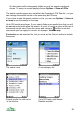
Find Show the Find field, allowing you to search for specific
names in the currently visible list. Find matches from the
start of whole words, so typing “pa” would match both
“Paisley” and “Car park” but not “Space”.
78