
User manual




Organizer
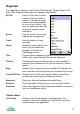
The Organizer is where you can access POIs, Routes, Tracks, Search, POI
Sets, Filter, Maps and Bookmarks to manage these objects.
My POIs: Lists the POIs that you have
created. POIs are points of
interest. They have a single
point and are displayed with
an icon of your choice. They
have a creation time and can
be given a category and a
description.
Routes: Lists the routes. Routes are
ordered lists of waypoints.
Tracks: Lists the tracks you have
recorded.
Search: Shows the search panel, from
which you can search the
gazetteer, POI sets and
ViewRanger server.
Filter: Controls which categories of feature / point-of-interest are
visible. Also controls which POI sets are displayed.
POI Sets: Collections of points of interest that you have created or
imported. Also contains an entry for the last set of search
results.
Maps: Shows the list of maps you have installed. If the maps are
from more than one country they will be grouped by country.
Licensed POI Sets: Shows the list of POI sets that have been licensed from
commercial sources such as Ordnance Survey.
Bookmarks: Store your favourite locations and revisit them.
Buddy list: Store the details of friends so you can view their location.
Downloads: Lists of the maps and other materials available to download
from the ViewRanger server.
Options Menu
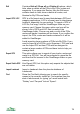
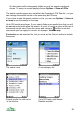
List Contents Shows the list of data objects for that data type. For
example, if Routes is highlighted, it will show a list of the
routes loaded in the application.
77