
User manual




theme - for example warning panels and menus - so choose an appropriate
theme for your phone.
Location Bar
When you are in small heading or full screen modes, a small location bar may
be shown under the heading bar. This bar contains location information.
The location bar is always shown in the Panorama, Navigation and Satellites
views.
It can be toggled on and off in the Map view by using the Settings > Map >
Show location bar switch.
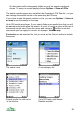
This diagram explains the items in the Location and Heading bars:
When the co-ordinates are:
1. Black they give the current location – in Panorama view the location from
which the panorama is calculated, in Map view the centre of the screen or
the selection location.
2. Red they indicate the GPS location is not currently valid, and the co-
ordinates are of the last valid GPS reading.
A battery meter is shown in the title bar. This changes to show a charger
symbol when external power is connected. This is not available on 2nd edition
phones.
76
Cursor keys mode
Altitude
Co-ordinates
GPS Heading
GPS Connected /
Track recording