
User manual




Settings
The Settings panel contains a range of controls allowing you to configure
ViewRanger. This section covers the settings related to the map and user
interface.
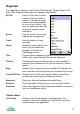
Options>
Edit This shows an edit panel for the selected item, for example
a text editor. Alternatively press the cursor pad centre or
button.
Save Changes Saves any changes you have made to settings and goes
back to the main Panorama view. Back does the same.
Discard Changes Discards any changes you have made to settings and goes
back to the main Panorama view using unchanged settings.
Reload Settings Reload the settings, discarding any changes you have
made.
Reset to Default Resets the settings (apart from ‘User’ settings) to factory
defaults
Exit Quits the ViewRanger application
UI
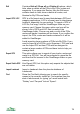
Co-ordinate Type Sets the co-ordinate type used by ViewRanger:
National Grid (e.g. 332650 517423)
10 digit grid ref (e.g. NY 32650 17423)
8 digit grid ref (e.g. NY 3260 1742)
6 digit grid ref (e.g. NY 326 174)
Longitude & Latitude (degrees, minutes, seconds, e.g.
W 1° 23’ 45.6’’)
Longitude & Latitude (degrees, decimal minutes, e.g.
W 1° 23.436’)
Longitude & Latitude (decimal, e.g. W 1.234°)
ITM (Irish Transverse Mercator)
UTM
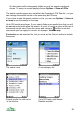
National grid When viewing global maps with the coordinate type set to
national grid ViewRanger will display UTM coordinates. Use
this setting to choose the national grid it should use.
If you view maps outside the area that is valid for those
coordinates, the software will revert to UTM.
71