
User manual




Manual Route Navigation
You can also manually select waypoints to navigate towards, rather than using
the automatic method described above.
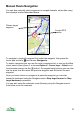
To navigate to a specific waypoint first select the waypoint, then press the
cursor pad centre or and choose Navigate to.
To select a waypoint you can use the route’s waypoints list, or can use the Map
view’s select cursor (press 1 or choose Options > Cursor keys > Select or on
touch screen phones use the button). On keypad based phones you can also
use the short cuts 4 to select the previous waypoint and 6 to select the next
waypoint.
Once you have chosen to navigate to a particular waypoint you can step
forward or backward using the Navigate menu’s Step target forward or Step
target backward commands.
You can start using the automatic route following using the Navigate menu’s
Auto follow route on command.
70
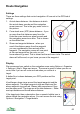
Chosen target
waypoint
Current GPS
position