
User manual


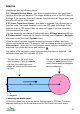

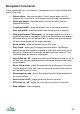
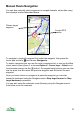

Detail of what happens as you reach the waypoint
As you reach the waypoint there are two target distances involved.
The navigation arrow points to the next waypoint. In the diagram below, as you
go from waypoint number 1 to waypoint 2, the arrow points towards waypoint 2.
When you reach the arrival alarm distance, the pink outer circle, the arrival
alarm will sound if you have it enabled.
The distance given by Settings > GPS > Show next wpt distance controls the
distance at which ViewRanger will consider you to have arrived at a waypoint. It
is shown as the inner yellow circle in the diagram below. Once you reach this
distance from a waypoint, the navigation arrow will start pointing to the following
waypoint. So in the diagram, when you reach the inner circle the navigation
arrow will start pointing at waypoint 3. Its default value is 15m.
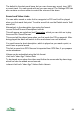
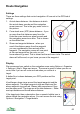
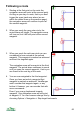
If you have alarms enabled, the arrow will still be red while you are within the
alarm distance.
67
The outer circle (pink) is the arrival
alarm – once you enter the circle
the alarm sounds and the
navigation arrow is drawn red
Once you enter the inner circle
(yellow), the navigation arrow
shows the direction to the third
waypoint
3
2
1
1
2