
User manual




Following a route
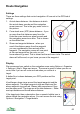
1. Starting at the first point on the route the
navigation arrow will point at the second point.
As long as you stay on route, that is you don't
trigger the cross track error alarm (so are
within the dotted lines on the previous page),
the navigation arrow will continue to point at
the second waypoint.
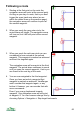
2. When you reach the grey outer circle, the
arrival alarm will trigger. The navigation arrow
will turn red, but it will still point at the second
waypoint.
3. When you reach the red inner circle you are
considered to have arrived at the second
waypoint. This waypoint is marked as achieved
and won’t be targeted again.
The navigation arrow will now point at the third
waypoint. The arrival alarm continues to sound
until you pass the current waypoint - that is you
are closer to the next leg of the route.
4. You are now navigated to the third waypoint.
Once you have arrived at a waypoint that
waypoint is marked as achieved. ViewRanger
won't consider that waypoint again, or any
before it. However, you can override that with
menu commands.
Even if you now go backwards towards
waypoint 1 the navigation arrow will still point
at waypoint 3. You can however change this by
choosing Options > Navigation > Step target backwards.
66