
User manual




Route Navigation
Settings
There are three settings that control navigation. All are set in the GPS tab of
settings.
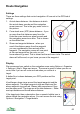
1. Arrival alarm distance - the distance at which
the arrival alarm sounds and the navigation
arrow turns red. This is the grey outer circle in
the picture.
2. Cross track error (XTE) alarm distance - if you
go more than this distance away from the
route the cross track error alarm sounds and
the navigation arrow turns blue. This is shown
as the dotted line.
3. Show next waypoint distance - when you
reach this distance away from the waypoint
you are considered to have arrived at the
waypoint. The navigation arrow will now point
at the next waypoint on the route, so you
know where to go next. This is shown as the red inner circle. The arrival
alarm will still sound, so you know you are at the waypoint.
Display
We recommend you switch on the navigation arrow using Options > Organizer
> Settings > Map > Show navi arrow. The arrow is green to show you are on
route, blue if you are off route and red when you arrive at a
target.
A dotted line is drawn between your GPS position and the
target point.
ViewRanger draws rings around the target waypoint and the
alarm waypoint. The target waypoint rings are black and the
alarm waypoint rings are red. Alarms take precedence if they
are the same point. The rings are at the two distances – Show
next wpt distance and Arrival alarm distance.
If the target point has a description then a speech bubble icon is
shown below the navigation arrow. You can access the text using
Options > Navigation > Target details.
65