
User manual




Alarms
ViewRanger has two different alarms:
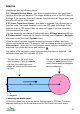
POI / Waypoint Arrival Alarm – this alarm is triggered when you reach your
target point or the next waypoint. The trigger distance is set in the GPS page of
Settings. If the distance is set to 50 metres, then the alarm will trigger when you
are within 50 metres of the target.
XTE (Cross Track Error) Alarm – this alarm is triggered if you deviate too far
from the route. The trigger distance is set in the GPS page of Settings. If the
distance is set to 100 metres, then the alarm will trigger if you are more than
100 metres from the route.
You can switch the two alarms off individually using POI/wpt alarm on/off and
XTE alarm on/off – these can be found in the Map view’s Options > Navigate
sub-menu or the Trip view’s Options menu.
When an alarm has been triggered a warning message is shown and your
chosen sound played every 10 seconds. You can silence an alarm by choosing
Silence alarm – again this is in the Navigate menus, but also available in the
map view if you press the cursor pad centre or .
The colour of the navigation arrow changes when the alarm is triggered – red
indicates arrival and blue indicates off route.
Choosing the alarm tone
Choose the alarm tone or sound on the Settings panel’s GPS tab. There are
separate settings for the Arrival alarm and for the Cross track error alarm.
63
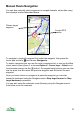
The pink circle is the arrival alarm
– once you enter the circle the
alarm sounds and the navigation
arrow is drawn red
1
st
waypoint
2
1
The blue box is the cross track
error boundary. If you go outside
this box, the cross track error
alarm will sound and the arrow will
go blue