
User manual
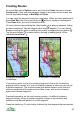
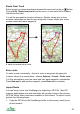
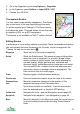
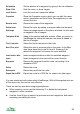

Track Settings
The settings panel (Options > Settings) contains a page of track specific
settings.
Record track Whether the application should record a track log (the route
you take) whenever you connect to a GPS. Also controlled
from the Map view’s Options > Create > Record track
item.
Track Mark Time ViewRanger draws arrows along a track indicating the
direction you travelled. Their spacing is at regular time
intervals given by this setting.
Track Minimum
Distance
This is the distance you must move before a new point is
added to the track. The larger the value the less memory
the track consumes. At the default value of 10 metres, a
point will only be added when you move 10 metres from the
current location.
Track Minimum
Time
This is the minimum time ViewRanger waits before adding a
point to the track.
Track Split Time When you start recording a track, ViewRanger will normally
start a new track. Track split time allows you to extend an
existing track if it is recent enough. At the default value of
60 minutes, if you took a break of 50 minutes then when
you resumed ViewRanger would extend the previous track.
But if you took a break of 70 minutes, ViewRanger would
start a new track.
If an existing track is extended, then the new section is
saved as a separate track segment. The line to the previous
track segment is drawn with a fine line and is ignored by
distance calculations.
51