
User manual
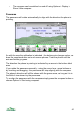
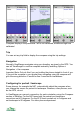
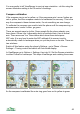
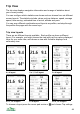


A recorded track shown on The details view for the track.
the Map view.
The spacing of the arrows on the track is at regular time intervals, the interval
being controlled in Settings (Track mark time, see page 51).
The Details view shows a range of statistics about the route including: length;
real length (allows for ups and downs); height gain and loss; maximum and
minimum height; average and maximum speed; number of points.
To access the Details view, select a track in the Map view or in a list, press the
cursor pad centre or button and choose Details from the context menu.
Tracks and Phone Memory
Tracks can require a lot of memory. ViewRanger minimises this by only loading
tracks when it needs to display or extend them. To avoid any negative impact
on performance:
1. Hide (or delete) tracks when you don’t need them visible. In the list of
Tracks in the Organizer, there is a menu option Options > Edit > Hide all
tracks.
2. In Settings use as large a value for Track minimum time and Track
minimum distance as you can. Do not use very small values.
3. Switch track recording off when you don’t need to record a track – from the
Map view use Options > Create > Stop track recording.
49