
User manual


Trip View
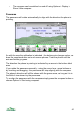
The trip view displays navigation information and a range of statistics about
your current journey.
You can configure which statistics are shown and can choose from six different
screen layouts. The statistics include values such as distance, speed, average
speed, time moving, estimated time of arrival, altitude and pace.
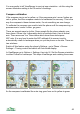
You can save different combinations and layouts as profiles, and step through
the profiles like pages with the arrow keys.
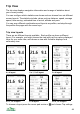
Trip view layouts
There are six different layouts available. Each profile can have a different
layout. For example, you might choose the view with just four values displayed
large for your main view, and choose a view with 8 smaller displays for a
secondary view.
4 x 4 layout 2 x 1, 2 x 2 layout 2 x 4 layout
2 x 1, 1 x 4 layout 1 x 8 layout 2 x 2, 1 x 4 layout
To choose a layout press the cursor pad centre or and choose Trip settings.
44