
User manual
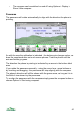
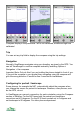
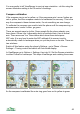
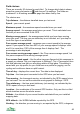
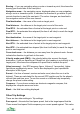
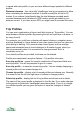


Compass display in the panorama - left is not calibrated, middle and right are
calibrated
Trip
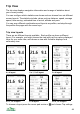
You can set any trip field to display the compass using the trip settings.
Navigation
Normally ViewRanger navigates using your heading, as given by the GPS. You
can tell ViewRanger to use the compass instead by selecting Options >
Navigation > Use compass.
Important Note: Only do this if you are holding the phone straight in front of you.
If you put the compass in your pocket then navigating using the compass will
give the wrong direction. It would be fine if mounted on handlebars.
Configuring for portrait / landscape
Some phones, for example the N97, automatically adjust the compass when
you change the screen for portrait to landscape. However, other phones, such
as the 6210, do not.
In ViewRanger you can set a correction for each orientation using the Compass
section of Settings. For the N97 leave both the portrait and landscape
corrections set to 0 degrees. For the 6210 leave portrait set to 0 degrees and
set landscape to 90 degrees. For other phones experiment.
42