
User manual


Electronic Magnetic Compass
The following phones contain an electronic compass, which is supported by
ViewRanger from version 2.7.24 onwards:
5th edition: Nokia: N97; N97-mini. Samsung: i8910HD.
3rd edition: Nokia E72; E55; E52; 5730; N86; 6720; 6710; 6210.
Map view
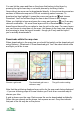
ViewRanger displays a compass indicator to the bottom left of the map view.
The white arrow points to north, the black line indicates grid north. To make the
map align with the countryside around you, rotate the phone until the white
arrow lines up with the black line.
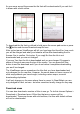
The outer ring of the compass changes colour to show whether the compass is
calibrated and how accurate its current reading is. Red means the compass is
not accurate; yellow means it has limited accuracy; and green means it is
accurate.
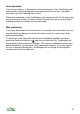
To calibrate the compass rotate it a couple of times about two different axes -
for example turn it twice about its vertical axis, then twice about a horizontal
axis. Do this until the outer ring of the compass turns green. (For more on
calibration, see later in this final section.)
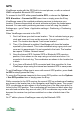
As the compass is calibrated the outer ring goes from red to yellow to green
Notes:
• The white arrow takes account of the magnetic variation that you set in
the UI section of Settings.
• If auto rotate is enabled (using Options > Display) then the map will
rotate by multiples of 90 degrees to best align with north.
40