
User manual
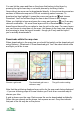


Satellite Status
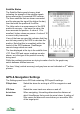
The Satellite Status panel shows a chart
indicating the strength of the satellite signals
being received by a connected GPS receiver.
The more satellites that are shown connected
and the stronger the signal (the higher the bar),
then the better the positional fix will be.
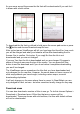
The Hdop value is a measurement of the GPS
position’s accuracy – the lower the value, the
more accurate the position. A value of 1.0 is
excellent, higher values are poorer. A value of 10
or more is very inaccurate.
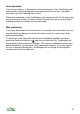
If any of the bars are grey this indicates that they
are not being used by the GPS to calculate the
position. Note that this is completely within the
control of the GPS hardware, ViewRanger
cannot change which are used.
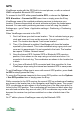
The time displayed at the top is the satellite time,
UTC. Raw GPS and sensor readings are also
shown, as is the type of the position currently
being used.
While the positioning services are trying to make a first fix, the graph may
switch between different sources.
The time, Vdop (vertical accuracy) and grey bars are not indicated on 2
nd
edition
phones.
GPS & Navigation Settings
The Settings panel has a GPS tab containing GPS specific settings:
POI/wpt alarm Switch the alarm for arriving at a POI or waypoint on and
off.
XTE Alarm Switch the cross track error alarm on and off.
Arrival alarm
distance
When navigating, this setting determines the distance at
which ViewRanger first sounds its arrival alarm. A setting of
50m means the alarm will sound when you are within 50m
of the target point.
35