
User manual


Tracker battery low sound / colour - like the position alert, this sets the
behaviour when a battery low message is received, or in the case of Retrieva
when the battery voltage is detected to be low.
Tracker emergency sound / colour - like the position alert, this sets the
behaviour when an emergency/SOS message is received.
Tracker geofence/motion sound / colour - like the position alert, this sets the
behaviour when a geofence breach message is received, or when a motion or
parking alarm is received.
Tracker custom sound / colour - like the position alert, this sets the behaviour
when a custom message is received.
Tracker Alarms
If a battery low, geofence breach, emergency/SOS or custom message is
received, ViewRanger will set an alarm flag. It will continue to report this alarm
until you clear the alarm, which you can do by highlighting the tracker in the list,
pressing the cursor pad centre or button and choosing 'Clear alarms'.
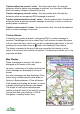
The alarm is reported at the top of the map view when the tracker is at the
centre of the screen and in the list of trackers. The border around the icon in the
map view will flash.
Map Display
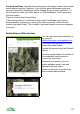
When a message is received, the track is
displayed at the centre of the map.
Its name, a summary of its status and the time
of the message are displayed at the top of
screen.
Any alert messages are also displayed. Clear
these using a tracker specific clear alarm or
Options > Beacon/tracker > Clear all alarms.
If the speed and heading are known, an arrow
is drawn indicating the direction and speed.
The length is how far the tracked person,
vehicle or dog will travel in the next 10 minutes
(control this time using Options > GPS &
Navigation > Heading vector time).
117