
User manual


Watching and Locating Buddies and
Trackers
You can watch or locate single buddy or tracker, a
subset of buddies or all your buddies. Watch checks
the location repeatedly, locate checks the location
just once.
To watch or locate an individual buddy use the map
view’s Options > Beacon & tracker > Locate now
or Watch / track. You will be shown a list of
buddies and trackers to choose from. It includes an
item to add a new buddy or tracker.
You can also locate or watch an individual buddy by
going to the buddy list, highlighting the buddy,
pressing the cursor pad centre or button and
choosing Locate buddy now or Watch buddy on.
To locate or watch a list of buddies go to the buddy list
and choose Options > Locate list or Watch list. All
enabled buddies will be located and the map will
move to show them all.
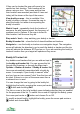
While a buddy is near the screen centre - under the
selection cross – the buddy’s name and time stamp is
shown at the top of the screen.
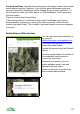
As the buddy or tracker's position updates over time
its last few locations are indicated with a dotted trail.
Beacon Status
An icon indicating the status of the beacon is shown in the title bar. If the arrow
points outwards the beacon is set to repeat, if the arrow points inwards the
watch is set to repeat. If the arrow points both ways it is set to both send and
watch. This is not available on 2
nd
edition phones.
Beacon Settings
The beacon tab in Settings contains a number of settings. Many of these are
specific to SMS trackers, but a few are relevant to the ViewRanger buddy
beacon:
Auto start beacon. When switched on this tells ViewRanger to automatically
start the buddy beacon transmitting when ViewRanger starts It will also connect
to the GPS.
112