
User manual
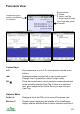



Panorama Settings
There are two pages of panorama settings, accessed through Options >
Settings.
Panorama View
These settings relate to the position and size of the panorama view.
View Radius Sets the maximum distance that ViewRanger calculates.
Increasing this value will increase the amount of memory
that ViewRanger requires, and increase the processing time
to draw the panorama. The default of 35km requires
between 2Mb and 3Mb of free memory, depending on the
view
Eye Height Sets the height of the viewer above the land, default is
1.7m.
Jump Height Sets the height for the Jump command.
Exaggeration When exaggeration is set to 1.0, the height of hills is shown
in the correct proportion to their width. If you set the
exaggeration to 2.0, hills would be shown stretched to twice
their real vertical height. Using a value of 1.5 or 2.0 is useful
in a flatter landscape to make it easier to identify hills.
Use GPS Heading If this option is switched on, then when you press 2 or
choose Use GPS position ViewRanger will rotate the
Panorama view to be centred on your current heading, as
well as updating its location to match the GPS. So if you
were walking west, then ViewRanger would rotate its
Panorama view to be centred on west.
View Direction Sets the viewing direction.
View Span The field of view for the panorama.
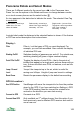
Panorama Display
These settings control the display and shading of the panorama view.
Shade Land Controls whether the land is shaded green. Screen drawing
is faster if shading is switched off. If you are outdoors on a
bright day then switch off shading, as the screen will then
be easier to see. (Pressing 7 on the keypad, or the
mountain top button on touch phones, toggles this switch.)
Shading Time of Sets the effective angle of the sun used when shading the
108