
User manual
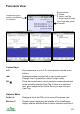


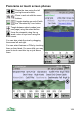


Panorama on touch screen phones
Rotate the view using the left
and right arrow buttons.
Zoom in and out with the zoom
buttons.
Tooggle shading on and off with
the "mountain top" icon button.
Toogle between select modes (see
next page) using the select button.
Jump the viewpoint using the up
arrow, return to eye level using the
down arrow.
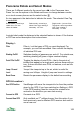
You can also rotate the view by dragging
the screen left and right.
You can select features or POIs by touching
them or their labels. For some hills you may
need to touch near thier top or just above
them.
104