
User manual



ROUTE 66 Mobile 2006 Symbian UIQ
26
Tip:
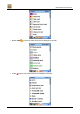
Tap or to select or deselect all points-of-interest at once.
Zoom To
When you are in the Zoom to screen, tap:
• Locations to search for an address, point-of-interest or the address of a contact and to show one of
them on the map.
• Favourites to show a favourite destination on the map.
• History to show a recent destination on the map.
• Contacts to show an address of a contact on the map.
• Route to zoom to the route (only enabled if a route has been calculated).
• Entire map to display the entire map.
• GPS position to zoom to the current GPS position (only enabled if a GPS receiver is connected
to the smartphone).
• POI around GPS position to search for points-of-interest around the current GPS position
(only enabled if a GPS receiver is connected to the smartphone) and to zoom to one of them.
• Destination to zoom to the destination point (only enabled if a route has been calculated or when
you are navigating).
• POI around destination to search for points-of-interest around the point of destination of the route
(only enabled when a route has been calculated or when you are navigating) and to zoom to one of
them.