
User manual





ROUTE 66 Mobile 2006 Symbian UIQ
19
Plan a Route
Remark:
Select this option if you want to calculate a route just to obtain a route description. While doing this, your
Bluetooth GPS receiver does not have to be connected to your smartphone.
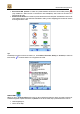
When you are in the Plan a route screen, tap:
• Locations to search for an address, point-of-interest or the address of a contact and add it as the
departure / destination of the route.
• Favourites to add a favourite as the departure / destination of the route.
• History to add a recent destination as the departure / destination of the route.
• Contacts to add an address of a contact as the departure / destination of the route.
• Current position to add the current position on the map as the departure / destination of the route.
• POI around GPS position to search for points-of-interest around the current GPS position
(only enabled if a GPS receiver is connected to the smartphone) and to add one of them as the
departure / destination of the route.
Note:
When Departure / Destination is displayed at the top of the screen, the location is added as the departure /
destination of the route.
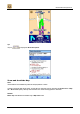
After the route calculation is complete, the route is displayed on the map. You can simulate the navigation
turn-by-turn, by tapping on to show the next turn or on to show the previous turn. Please note that
only the 2D perspective is available in this mode.